
Cloud FinOps Best Practices: How Enterprises Can Optimize Cloud Spending
Introduction
Cloud computing enables enterprises to scale applications, launch digital services, and adopt new technologies without maintaining all their own infrastructure. However, as cloud environments grow, controlling spending can become increasingly difficult.
Unused resources, oversized virtual machines, inefficient storage, unexpected data transfer charges, and poorly monitored workloads can increase cloud costs.
Cloud Financial Operations, commonly known as FinOps, helps organizations connect cloud spending with business value. By combining financial accountability, engineering practices, and continuous optimization, enterprises can make better decisions about how they use cloud resources.
Following cloud FinOps best practices helps organizations improve cost visibility, reduce waste, and balance spending with performance, security, and reliability.
In this guide, we explore the fundamentals of FinOps, practical optimization techniques, and a roadmap for implementing cloud financial management.
What Is Cloud FinOps?
Cloud FinOps is an operational practice that brings together engineering, finance, operations, and business teams to manage cloud expenditure and maximize the value of technology investments.
Traditional infrastructure budgeting often focuses on purchasing capacity in advance. Cloud environments can change more frequently because resources are provisioned, scaled, and consumed dynamically.
FinOps helps organizations understand these changing costs and make informed decisions throughout the cloud lifecycle.
Its core activities include:
- Improving visibility into cloud spending.
- Allocating costs to applications, teams, and business units.
- Forecasting expenditure and managing budgets.
- Identifying inefficient resource usage.
- Evaluating pricing and purchasing options.
- Measuring cloud costs against business outcomes.
FinOps is not simply about reducing the monthly cloud bill. It is about using cloud resources efficiently while meeting business requirements.
Why FinOps Matters for Enterprise Cloud Environments
1. Improve cloud cost visibility
Organizations need to understand which services, applications, and teams generate cloud costs.
Without consistent tagging, allocation, and reporting, it can be difficult to identify the source of unexpected expenditure.
2. Reduce unnecessary resource usage
Development environments, unused storage volumes, unattached resources, and oversized compute instances can generate avoidable costs.
Regular reviews help identify resources that can be removed, resized, or scheduled more efficiently.
3. Improve financial forecasting
Historical usage patterns, business growth, and planned deployments can help teams estimate future cloud spending.
Forecasting enables organizations to plan budgets and investigate unexpected cost changes earlier.
4. Strengthen accountability
When teams can see the costs associated with their applications, they can make better architectural and operational decisions.
Shared dashboards and cost allocation policies help connect engineering decisions with financial outcomes.
5. Balance cost with performance
The cheapest infrastructure option is not always the best choice. Reducing resources too aggressively may affect application performance, availability, or user experience.
FinOps encourages teams to evaluate cost alongside reliability, security, and business value.
Eight Cloud FinOps Best Practices
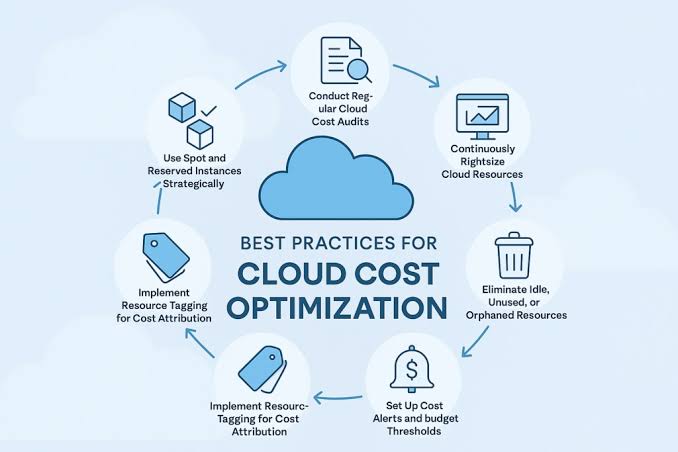
1. Establish cost visibility and allocation
Begin by collecting cloud cost information from the services and accounts used by your organization.
Use a consistent tagging or labeling strategy to associate resources with applications, environments, teams, and business units.
For example, a resource might include labels such as:
- Application: Customer Portal
- Environment: Production
- Team: Platform Engineering
- Cost Center: Digital Services
Not every cloud service supports identical allocation methods, so establish suitable policies for your environment.
Review unallocated spending regularly and investigate resources that lack the information needed for accurate reporting.
2. Right-size compute resources
Compute resources that are larger than workload requirements can increase expenditure without delivering proportional business value.
Review CPU utilization, memory consumption, network usage, and workload patterns before changing instance sizes.
Consider whether applications need fixed capacity or can benefit from autoscaling.
For non-production workloads, evaluate whether resources can be stopped outside working hours.
Always validate changes through performance monitoring and testing to avoid introducing capacity problems.
3. Eliminate unused cloud resources
Unused resources can remain active after testing, migrations, or application changes.
Regularly review:
- Unattached storage volumes.
- Idle virtual machines.
- Unused snapshots and old backups.
- Unused load balancers and public IP addresses.
- Abandoned development environments.
- Orphaned cloud resources from retired applications.
Establish ownership and approval procedures before deleting resources. Some apparently idle resources may support recovery, compliance, or infrequent business processes.
4. Optimize storage and data transfer
Cloud storage costs depend on factors such as capacity, access patterns, redundancy, retrieval operations, and retention requirements.
Choose storage tiers that match how frequently data is accessed. Apply lifecycle policies to move eligible data to lower-cost storage or remove it after approved retention periods.
Review data transfer between regions, availability zones, cloud providers, and external systems.
Architecture changes that reduce unnecessary data movement can improve both cost efficiency and application performance.
5. Select suitable pricing models
Cloud providers offer different purchasing options, including on-demand pricing, commitments, and eligible spot or interruptible capacity.
Evaluate pricing options according to workload stability, flexibility, and business risk.
- Use on-demand resources when flexibility is important.
- Consider commitments for predictable baseline workloads.
- Evaluate spot capacity for workloads that can tolerate interruption.
- Avoid long-term commitments for resources whose usage is uncertain.
Review commitment utilization regularly and confirm that the expected savings justify the associated obligations.
6. Set budgets, alerts, and forecasts
Budgets help teams compare actual spending with planned expenditure.
Configure alerts for unusual spending patterns, forecasted budget overruns, and unexpected changes in resource consumption.
Where supported, use automated policies to restrict certain non-production activities or notify resource owners when spending exceeds defined thresholds.
Do not rely on budget alerts alone. They may arrive after costs have already been incurred, so preventive controls and regular reviews remain important.
7. Integrate FinOps into DevOps
Cloud cost optimization is more effective when considered during application design and deployment.
Engineering teams can include cost-related checks in their development workflows, such as:
- Infrastructure configuration reviews.
- Resource sizing validation.
- Cost estimates for planned deployments.
- Monitoring of resource utilization.
- Automated cleanup of temporary environments.
- Reviews of expensive database queries and application operations.
Cost awareness should become part of normal engineering decisions rather than a separate activity performed only by the finance team.
8. Measure unit economics and business value
Total cloud spending does not always reveal whether an application is becoming more efficient.
Measure costs against meaningful business metrics, such as cost per transaction, cost per active customer, cost per report generated, or cost per completed AI task.
Compare these metrics over time while accounting for changes in workload volume and service quality.
Unit economics helps teams understand whether cloud investment is supporting business growth efficiently.
Implementing FinOps Across AWS, Azure, and Google Cloud
Enterprises using multiple cloud providers need consistent financial management practices while accounting for differences in pricing and reporting.
AWS
Use AWS cost management and reporting capabilities to analyze expenditure, review usage, allocate costs, and evaluate purchasing options.
Establish appropriate tagging standards and review resource utilization regularly.
Microsoft Azure
Use Azure cost management capabilities to review consumption, organize resources, set budgets, and investigate cost changes.
Apply consistent tagging and allocation policies across subscriptions and resource groups.
Google Cloud
Use Google Cloud cost reporting and billing analysis capabilities to understand expenditure across projects and services.
Combine cost reports with resource ownership information to identify optimization opportunities.
Multi-cloud cost governance
Avoid comparing cloud providers only by the price of individual virtual machines or storage services.
Evaluate the complete workload, including data transfer, licensing, operational effort, resilience, support, and performance requirements.
A consistent allocation model and shared reporting process help teams make more informed decisions across cloud platforms.